Teensy
Arduino library
Directory structure:
--------------------

lur
├── lur.cpp
├── lur.h
└── messages.h
The following objects are implemented
Sub - Main control. Handles all other objects.
Jetson - Serial communication interface with Jetson.
Motors - Contains 8 servo objects that are the motors
Sonar - Parsing and controls for ping sonar
IMU - Inertial measurement unit data handling
Building
Copy lur directory to arduino library directory on your computer
/your/path
└── Arduino
    └── libraries
        └── lur
            ├── lur.cpp
            ├── lur.h
            └── messages.h
In arduino ide, open teensy.ino and compile/upload.
Message protocol
The Teensy and the Jetson talk through a usb serial connection.
Each message is formatted as follows:
Common protocol
-------------------------------------
| byte |  type   |  name   | values |
-------------------------------------
|   0  |  uint8_t  | header  |  0xff  |
-------------------------------------
|   1  |  uint8_t   |  id     |  0-255 |
-------------------------------------
|  2-n | see specs | footer  |  0xff  |
-------------------------------------
|  n+1 | uint8_t | footer  |  0xff  |
-------------------------------------

Data values
Thruster config
This is the configuration we use. It is based on the ArduSub Vectored ROV with Four Vertical Thrusters.
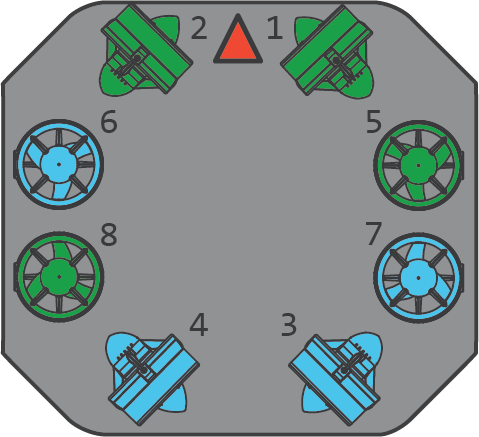
The following matrix represents the configuration of the thrusters.
The columns are the individual thrusters, while the rows are the directions.
-------1  2  3  4  5  6  7  8
x     |
y     |
z     |
roll  |
pitch |
yaw   |

const float thruster_config[6][8] = {
  {  1.0,  1.0, -1.0, -1.0,  0.0,  0.0,  0.0,  0.0  },
  {  1.0, -1.0,  1.0, -1.0,  0.0,  0.0,  0.0,  0.0  },
  {  0.0,  0.0,  0.0,  0.0,  1.0,  1.0,  1.0,  1.0  },
  {  0.0,  0.0,  0.0,  0.0, -1.0,  1.0, -1.0,  1.0  },
  {  0.0,  0.0,  0.0,  0.0,  1.0,  1.0, -1.0, -1.0  },
  { -1.0,  1.0,  1.0, -1.0,  0.0,  0.0,  0.0,  0.0  }
};
To calculate the power value for thruster 5 going in the z direction (ascend/descend) at a power value p, we multiply p by the value in the 3rd row, 5th column.
Calibrating
Calibrating the thruster values requires running tests in the water.
Working in one direction at a time, run several tests in that direction and monitor the results. After observing the movement of the drone, go through each thruster and adjust the value in the matrix according to the needed relative power of the thruster.
For example if you are running an x direction test and the drone is pulling the right
Note
Values should be between -1 and 1, inclusive. These represent either a full power reverse or full power forward.
Code reference
The following are all the objects that are implemented and their associated methods.
struct Motors {
  bool  armed;
  Servo thrusters[NUM_THRUSTERS];
  Motors();
  void init();
  void arm();
  void disarm();
  bool set_power(const int (&values)[NUM_THRUSTERS]);
  void add_to_power_vector(int (&values)[NUM_THRUSTERS], const float (&config)[NUM_THRUSTERS], int val);
  int  normalize(int n, int min, int max);
  void normalize_array(int (&values)[NUM_THRUSTERS]);
  bool manual_control(int x, int y, int z, int roll, int pitch, int yaw);
};

struct Sonar {
  Ping1D         device;
  SoftwareSerial ping_serial;
  Sonar();
  bool init();
};

struct IMU {
  Adafruit_BNO055 device;
  IMU();
  bool init();
  uint8_t get_temp();
};

struct Jetson {
  Jetson();
  bool init();
  bool send();
  bool receive();
};

struct Sub {
  Mode  mode;
  Motors* motors;
  Sonar* sonar;
  IMU* imu;
  Sub();
  bool set_mode(Mode m);
};